用Chrome插件爬取一切网页数据
/ 10 min read
本期教程,我们来学习如何基于Chrome插件爬取网页数据。通过浏览器插件爬数据的方式虽然需要我们手动点击,不像写纯自动python脚本一样可以实现规模化和自动化采集,但是优势是能够绕过网站的反爬措施,更加灵活和可玩性更强。
并且也可以为我们之后学习爬虫知识铺垫基础,现在我们就来开始学习如何使用 Chrome插件爬网页数据吧。
1. 安装并运行扩展
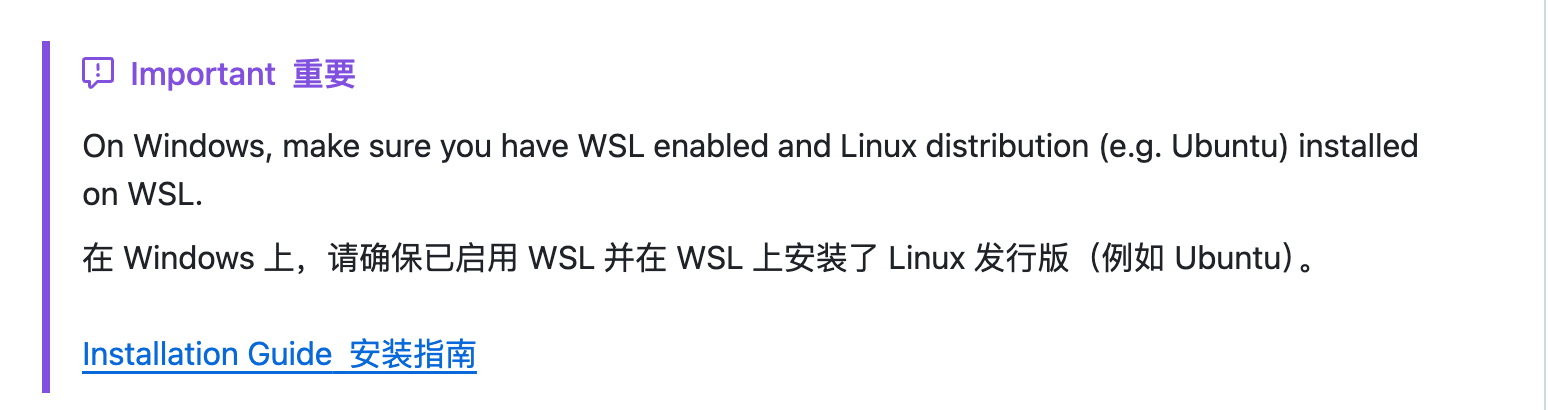
如果你使用的是 Windows 电脑,现在需要启用WSL,并且安装了 Linux 发行版
1.2 安装依赖
1. 如果你还没有安装pnpm,需要全局安装 pnpm (确保Node.js版本>= 22.12.0):
npm install -g pnpm2. 安装项目依赖:
pnpm install1.3 构建与开发
对于Chrome浏览器
1. 开发模式构建(Windows用户建议以管理员身份运行):
pnpm dev2. 在Chrome中加载扩展:
• 打开Chrome,进入 chrome://extensions • 开启右上角的“开发者模式”
• 点击左上角的”加载已解压的扩展”
• 选择项目中的 dist 目录
1.4 扩展基本结构
安装完成后,了解项目结构有助于我们进行爬虫开发:
• manifest.ts - 生成manifest.json的脚本
• src/background -后台脚本,可用于数据处理和存储
• pages/content -内容脚本,将直接在目标网页中运行
• pages/popup -点击扩展图标时显示的弹出窗口
2. 实战:爬Coze模板数据

2.1 网页结构分析
我们首先需要找到你想要爬的数据的循环结构,这一步通过打开【检查】后,在元素进行查找
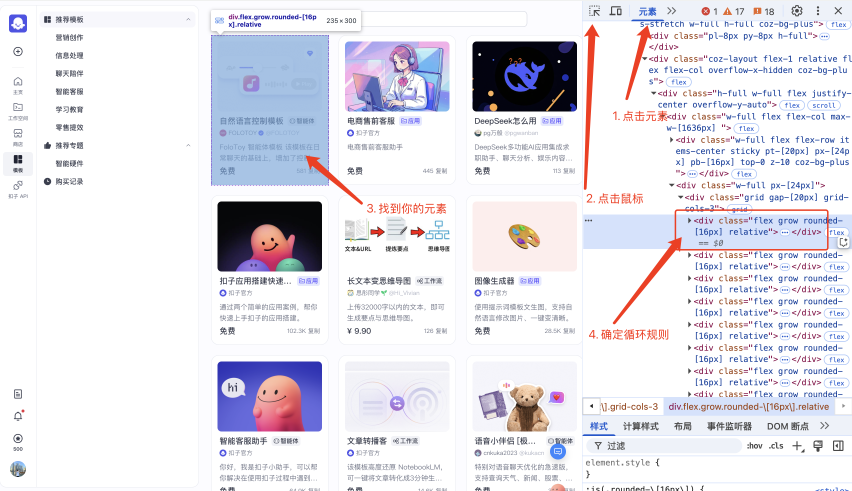
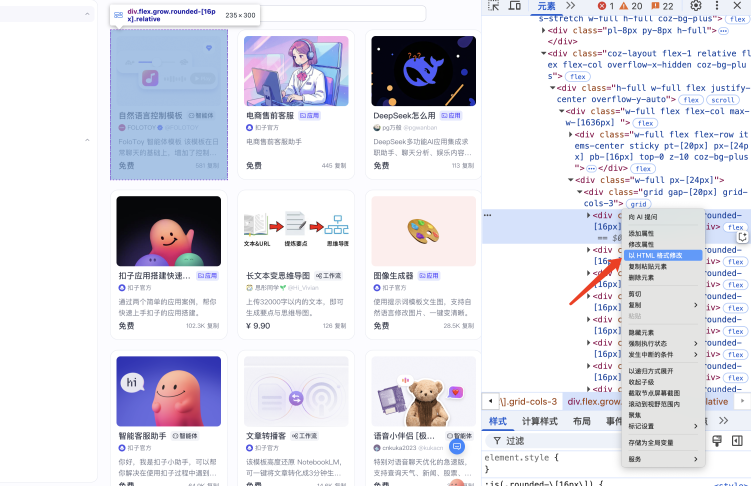
找到后点击鼠标右键,然后点击【以HTML格式修改】,然后直接复制整段HTML
2.2 让Cursor给到爬虫代码
到Cursor的Ask模式,复制粘贴一个的数据,并给到对应的提示词:
```<div class="flex grow rounded-[16px] relative"><article class="flex flex-col grow overflow-hidden p-[12px] pb-[16px] rounded-[16px] border border-solid coz-stroke-primary cursor-pointer coz-bg-max hover:coz-shadow-default"><div class="relative w-full h-[140px] rounded-[8px] overflow-hidden"><div class="semi-image w-full h-full"><img src="https://p6-flow-product-sign.byteimg.com/tos-cn-i-13w3uml6bg/ace08b1ff3f340fc9e0005d5e92f485d~tplv-13w3uml6bg-resize:800:320.image?rk3s=2e2596fd&x-expires=1746257405&x-signature=TeGGSrnQ9il%2FyJ2DSY4gakJlYNY%3D" data-src="https://p6-flow-product-sign.byteimg.com/tos-cn-i-13w3uml6bg/ace08b1ff3f340fc9e0005d5e92f485d~tplv-13w3uml6bg-resize:800:320.image?rk3s=2e2596fd&x-expires=1746257405&x-signature=TeGGSrnQ9il%2FyJ2DSY4gakJlYNY%3D" class="semi-image-img w-full h-full object-cover object-center"></div><div class="absolute top-[12px] right-[12px] w-[24px] h-[24px] flex items-center justify-center rounded-[8px] cursor-default bg-[#FFFFFF99] hover:bg-[#FFFFFFCC]" tabindex="0" aria-describedby="b9lnm4a" data-popupid="b9lnm4a"><svg class="icon-icon icon-icon-coz_diamond_fill text-[14px] coz-fg-color-brand" width="1em" height="1em" viewBox="0 0 24 24" fill="currentColor" xmlns="http://www.w3.org/2000/svg"><path fill-rule="evenodd" clip-rule="evenodd" d="M5.59813 2.70822C5.24001 2.70822 4.90923 2.89973 4.73092 3.21029L1.38035 9.04584C1.17027 9.41171 1.21243 9.87007 1.4857 10.1915L11.6952 22.1998C11.8549 22.3876 12.1449 22.3876 12.3046 22.1998L22.5141 10.1915C22.7874 9.87007 22.8295 9.41171 22.6195 9.04584L19.2689 3.21029C19.0906 2.89973 18.7598 2.70822 18.4017 2.70822H5.59813ZM7.9999 8.38351C7.44762 8.38351 6.9999 8.83123 6.9999 9.38351C6.9999 9.9358 7.44762 10.3835 7.9999 10.3835H15.9999C16.5522 10.3835 16.9999 9.9358 16.9999 9.38351C16.9999 8.83123 16.5522 8.38351 15.9999 8.38351H7.9999Z"></path></svg></div></div><div class="mt-[8px] px-[4px] grow flex flex-col"><div class="flex items-center gap-[8px] overflow-hidden"><span class="semi-typography coz-typography coz-text font-normal !font-medium text-[16px] leading-[22px] coz-fg-primary !max-w-[180px] semi-typography-ellipsis semi-typography-ellipsis-single-line semi-typography-ellipsis-overflow-ellipsis semi-typography-ellipsis-overflow-ellipsis-text semi-typography-primary semi-typography-normal"><span>自然语言控制模板</span></span><div aria-label="" class="semi-tag semi-tag-large semi-tag-square semi-tag-light semi-tag-white-light coz-tag coz-tag-small rounded-little coz-tag-primary h-[20px] !px-[4px] !py-[2px] coz-fg-primary font-medium shrink-0"><div class="semi-tag-content semi-tag-content-center"><svg class="icon-icon icon-icon-coz_bot " width="1em" height="1em" viewBox="0 0 24 24" fill="currentColor" xmlns="http://www.w3.org/2000/svg"><path d="M6.6001 11C6.6001 10.3373 7.13736 9.80005 7.8001 9.80005 8.46284 9.80005 9.0001 10.3373 9.0001 11V12.6C9.0001 13.2628 8.46284 13.8 7.8001 13.8 7.13736 13.8 6.6001 13.2628 6.6001 12.6V11zM16.2 9.80005C15.5373 9.80005 15 10.3373 15 11V12.6C15 13.2628 15.5373 13.8 16.2 13.8 16.8627 13.8 17.4 13.2628 17.4 12.6V11C17.4 10.3373 16.8627 9.80005 16.2 9.80005z"></path><path fill-rule="evenodd" clip-rule="evenodd" d="M6.02765 3.18198C3.80266 3.6894 2.00254 5.26794 1.49283 7.4924C1.21595 8.70076 1 10.2312 1 12.0655C1 14.14 1.27624 15.8043 1.60444 17.0496C2.09814 18.9228 3.58946 20.2807 5.46906 20.7494C7.03143 21.139 9.22717 21.5 12 21.5C14.7729 21.5 16.9687 21.139 18.531 20.7494C20.4106 20.2807 21.9018 18.9228 22.3955 17.0496C22.7238 15.8044 23 14.1401 23 12.0655C23 10.2311 22.784 8.70072 22.5072 7.49236C21.9974 5.26792 20.1974 3.6894 17.9724 3.18198C16.3835 2.81963 14.3235 2.5 12 2.5C9.67659 2.5 7.61653 2.81963 6.02765 3.18198ZM3 12.0655C3 13.9604 3.25207 15.4535 3.53839 16.5399C3.82905 17.6427 4.71438 18.5 5.95296 18.8089C7.369 19.162 9.40215 19.5 12 19.5C14.5979 19.5 16.6311 19.162 18.0471 18.8089C19.2856 18.5 20.1709 17.6427 20.4616 16.5399C20.7479 15.4535 21 13.9605 21 12.0655C21 10.3894 20.8028 9.00881 20.5577 7.93906C20.244 6.57015 19.1176 5.49451 17.5277 5.13192C16.0518 4.79533 14.1435 4.5 12 4.5C9.85658 4.5 7.94824 4.79533 6.47234 5.13192C4.88239 5.49452 3.75598 6.57018 3.44231 7.9391C3.19719 9.00884 3 10.3894 3 12.0655Z"></path></svg><span class="ml-[2px]">智能体</span></div></div></div><div class="semi-space container--U_GTkG9oTsph_x2s mt-[4px] semi-space-align-center semi-space-horizontal" x-semi-prop="children" style="gap: 4px;"><div class="semi-image avatar--rkyXQZutaIRhrHBO" style="width: 14px; height: 14px;"><img src="https://p3-passport.byteacctimg.com/img/user-avatar/05d72945c386e0b39c3934bb7714b6e2~300x300.image" data-src="https://p3-passport.byteacctimg.com/img/user-avatar/05d72945c386e0b39c3934bb7714b6e2~300x300.image" class="semi-image-img" width="14" height="14"></div><div class="semi-space semi-space-align-center semi-space-horizontal" x-semi-prop="children" style="gap: 2px;"><span class="semi-typography coz-typography coz-text font-normal txt--vsnbbFNoLhEkR7e4 name--rm_hbL8bKLQSDcPE semi-typography-ellipsis semi-typography-ellipsis-single-line semi-typography-ellipsis-overflow-ellipsis semi-typography-ellipsis-overflow-ellipsis-text semi-typography-primary semi-typography-normal"><span>FOLOTOY</span></span><img src="https://lf26-bot-platform-tos-sign.coze.cn/bot-studio-bot-platform/FileBizType.BIZ_LABEL_ICON/0_1720708586583142076_SfT9rxXHHo.image/png?lk3s=50ccb0c5&x-expires=1743751805&x-signature=GHUAy9Tp5XtLt%2FZ9tZqDIKSAfo0%3D" class="label-icon--RFWOROKdJgWL_H9c" tabindex="-1" aria-describedby="luvk9bd" data-popupid="luvk9bd"></div><span class="semi-typography coz-typography coz-text font-normal txt--vsnbbFNoLhEkR7e4 username--fCrb9nRo4YhmZG7w semi-typography-ellipsis semi-typography-ellipsis-single-line semi-typography-ellipsis-overflow-ellipsis semi-typography-ellipsis-overflow-ellipsis-text semi-typography-primary semi-typography-normal"><span>@FOLOTOY</span></span></div><div class="mt-[8px] flex flex-col justify-between grow"><span class="semi-typography coz-typography coz-text font-normal min-h-[44px] leadind-[20px] coz-fg-secondary semi-typography-ellipsis semi-typography-ellipsis-multiple-line semi-typography-ellipsis-multiple-line-text semi-typography-primary semi-typography-normal" style="-webkit-line-clamp: 2;"><span>FoloToy 智能体模板该模板在日常聊天的基础上,增加了控制玩具功能。复制后可一键发布至绑定的 FoloToy 玩具上,让智能体陪伴小朋友成长。已有的能力:支持通过自然语言理解,下发指令控制玩具语速,音量.日常聊天陪伴:以儿童的思路理解问题,并持续与儿童互动。支持联网搜索实时数据,包括:天气、新闻、股票财经等等</span></span><div class="mt-[4px] flex items-center justify-between"><div class="font-medium text-[16px] leading-[22px] coz-fg-primary">免费</div><div class="flex items-center gap-[4px] text-[12px] leading-[16px] coz-fg-secondary"><span>581</span><span>复制</span></div></div></div></div></article></div>```
请你给到我获取这个页面上所有类似元素的选择器javascript代码,并且返回给我数组的形式。我希望能够爬取所有数据,我要爬取的字段包括:1. 背景图: bgImg2. 应用类型: appType3. 标题: title4. 作者: author5. 描述: desc6. 价格: price7. 复制次数: copyCount
需要注意:不要使用特殊类名或者包含hash的元素选择器,而是应该找元素位置的规律2.3 测试代码
AI给出了代码之后,到浏览器的控制台中,复制AI给到的代码,复制粘贴,并且测试代码:
function scrapeCozeTemplates() {  // Get all template card elements  const templateCards = document.querySelectorAll('article.flex.flex-col.grow');
  const templates = [];
  templateCards.forEach(card => {    // Extract data from each card    const template = {};
    // 1. Background image    const imgElement = card.querySelector('.semi-image img');    template.bgImg = imgElement ? imgElement.getAttribute('src') : '';
    // 2. App type    const appTypeElement = card.querySelector('.semi-tag-content');    template.appType = appTypeElement ? appTypeElement.textContent.trim() : '';
    // 3. Title    const titleElement = card.querySelector('.flex.items-center.gap-\\[8px\\] > span');    template.title = titleElement ? titleElement.textContent.trim() : '';
    // 4. Author    const authorElement = card.querySelector('.name--rm_hbL8bKLQSDcPE');    template.author = authorElement ? authorElement.textContent.trim() : '';
    // 5. Description    const descElement = card.querySelector('.min-h-\\[44px\\]');    template.desc = descElement ? descElement.textContent.trim() : '';
    // 6. Price    const priceElement = card.querySelector('.font-medium.text-\\[16px\\]');    template.price = priceElement ? priceElement.textContent.trim() : '';
    // 7. Copy count    const copyCountContainer = card.querySelector('.flex.items-center.gap-\\[4px\\]');    const copyCountElement = copyCountContainer ? copyCountContainer.querySelector('span:first-child') : null;    template.copyCount = copyCountElement ? copyCountElement.textContent.trim() : '';
    templates.push(template);  });
  return templates;}
// Execute the function and return resultsscrapeCozeTemplates();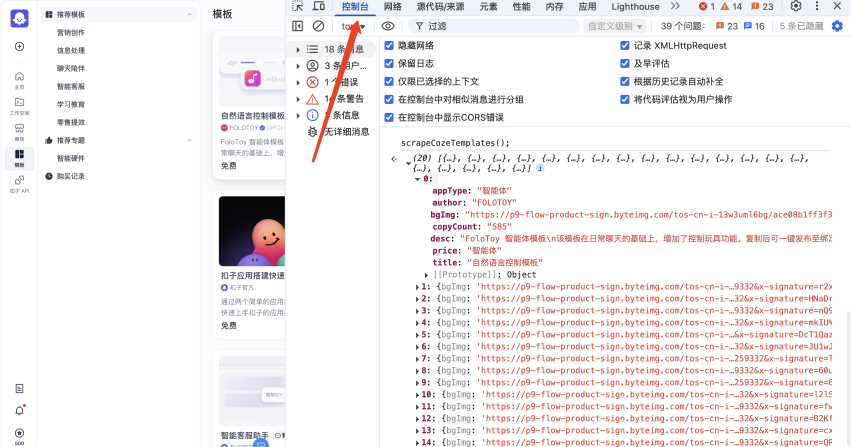
如果测试没有问题,发现所有的字段都正确,那么你就可以进行下一步。
这一步你的Cursor给到的代码很有可能和我不一致,你需要做的就是测试,如果 Al给的不对,和AI进行沟通.
2.4 Cursor完成数据获取的逻辑
将Cursor的聊天对话框切换到Agent模式,输入以下的提示词。让用户可以实现下载获取到的全部数据:
```function scrapeCozeTemplates() {  // Select all template cards (article elements with flex and grow classes)  const templateCards = document.querySelectorAll('article.flex');
  return Array.from(templateCards).map(card => {    // 1. Background image - find the first img inside the card    const imgElement = card.querySelector('.semi-image-img');    const bgImg = imgElement ? imgElement.src : '';
    // 2. App type - text content of the tag element    const appTypeElement = card.querySelector('.semi-tag');    const appType = appTypeElement ? appTypeElement.textContent.trim() : '';
    // 3. Title - the first prominent text element    const titleElement = card.querySelector('.overflow-hidden span');    const title = titleElement ? titleElement.textContent.trim() : '';
    // 4. Author - text near the avatar    const authorElement = card.querySelector('.semi-space:nth-child(2) span:first-child');    const author = authorElement ? authorElement.textContent.trim() : '';
    // 5. Description - the multi-line text section    const descElement = card.querySelector('.semi-typography-ellipsis-multiple-line');    const desc = descElement ? descElement.textContent.trim() : '';
    // 6. Price - text in the bottom left    const priceElement = card.querySelector('.font-medium');    const price = priceElement ? priceElement.textContent.trim() : '';
    // 7. Copy count - number in the stats section    const copyCountWrapper = card.querySelector('.flex.items-center.gap-\\[4px\\]');    const copyCountElement = copyCountWrapper ? copyCountWrapper.querySelector('span:first-child') : null;    const copyCount = copyCountElement ? copyCountElement.textContent.trim() : '';
    return {      bgImg,      appType,      title,      author,      desc,      price,      copyCount    };  });}
scrapeCozeTemplates();```
请你根据上面的代码,完成数据获取逻辑:1. 移除掉 @Popup.tsx 中所有的样式2. 在 @Popup.tsx 中添加一个按钮,按钮叫做:获取coze模板数据。3. 该按钮只有在@https://www.coze.cn/template 页面才能点击4. 用户点击按钮,执行你上面的代码,获取数据5. 数据保存为csv的格式,并且进行本地下载
如果顺利的话,你应该就能把数据完整的爬取下来并且保存为csv格式的啦!你可以很轻松的通过Excel或者WPS打开!
3. 源码